
SQL Roadmap

Here is a comprehensive 12-Week SQL Mastery Roadmap based on the topics you provided. This structure moves logically from understanding data storage to mastering complex analytical queries.
System Design Refresher
Designing a Robust Distributed Logging System for Modern Applications
20 System Design Concepts Every Developer Should Know - Part - I
Phase 1: Foundations of Data (Weeks 1-2)
Goal: Understand where data lives and how to build the structures to hold it.
Week 1: Concepts & Basic Syntax
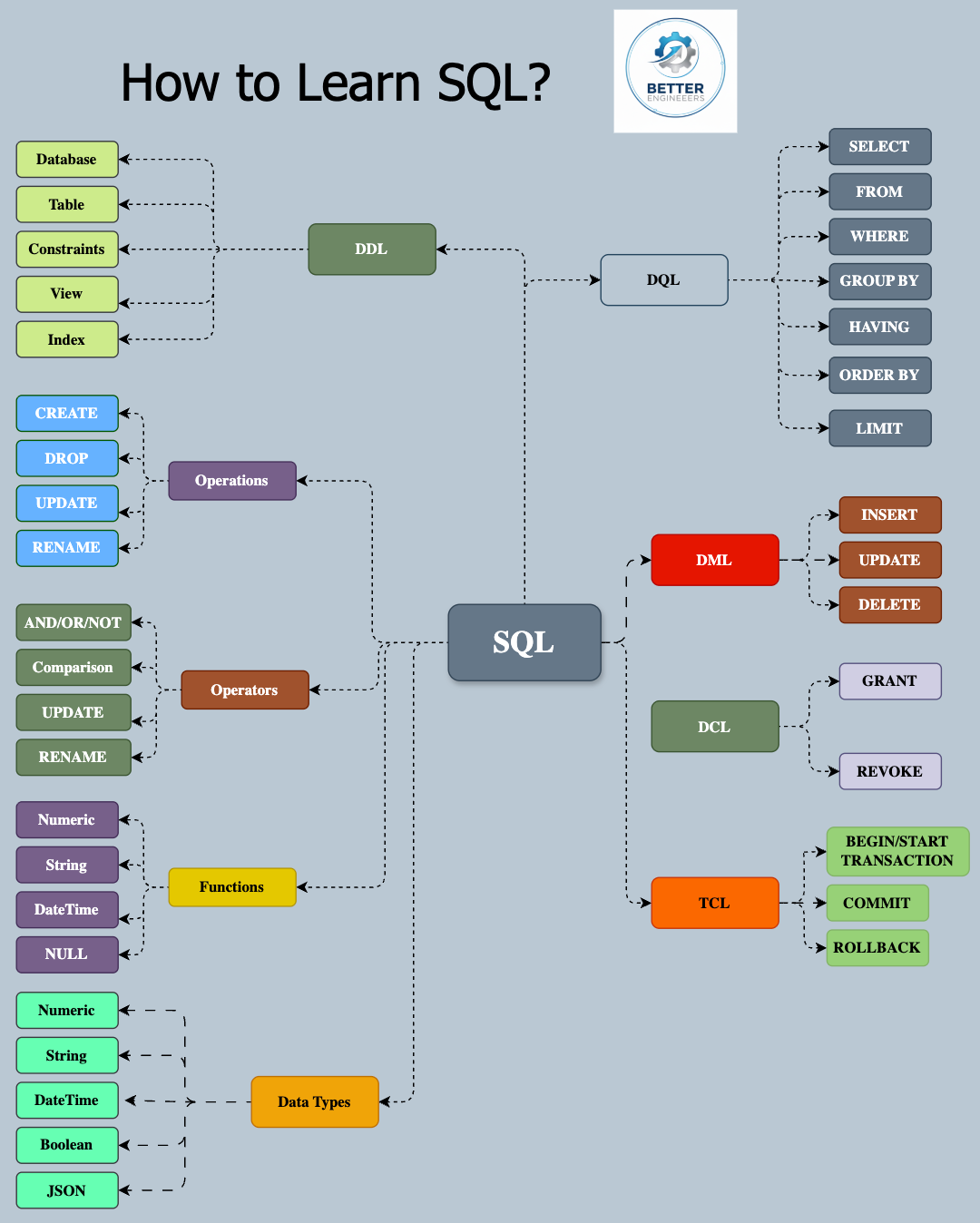
SQL, which stands for Structured Query Language, is a programming language that is used to communicate with and manage databases. SQL is a standard language for manipulating data held in relational database management systems (RDBMS), or for stream processing in a relational data stream management system (RDSMS). It was first developed in the 1970s by IBM.
SQL consists of several components, each serving their own unique purpose in database communication:
Queries: This is the component that allows you to retrieve data from a database. The SELECT statement is most commonly used for this purpose.
Data Definition Language (DDL): It lets you create, alter, or delete databases and their related objects like tables, views, etc. Commands include CREATE, ALTER, DROP, and TRUNCATE.
Data Manipulation Language (DML): It lets you manage data within database objects. These commands include SELECT, INSERT, UPDATE, and DELETE.
Data Control Language (DCL): It includes commands like GRANT and REVOKE, which primarily deal with rights, permissions and other control-level management tasks for the database system.
Week 2: Structuring the Database (DDL)
Data Definition Language (DDL) is a subset of SQL used to define and manage the structure of database objects. DDL commands include CREATE, ALTER, DROP, and TRUNCATE, which are used to create, modify, delete, and empty database structures such as tables, indexes, views, and schemas. These commands allow database administrators and developers to define the database schema, set up relationships between tables, and manage the overall structure of the database. DDL statements typically result in immediate changes to the database structure and can affect existing data.
Phase 2: Manipulating & connecting Data (Weeks 3-5)
Goal: Learn how to extract insights, combine tables, and summarize data.
Week 3: The Art of the Query (DML)
Data Manipulation Language (DML) is a subset of SQL used to manage data within database objects. It includes commands like SELECT, INSERT, UPDATE, and DELETE, which allow users to retrieve, add, modify, and remove data from tables. DML statements operate on the data itself rather than the database structure, enabling users to interact with the stored information. These commands are essential for day-to-day database operations, data analysis, and maintaining the accuracy and relevance of the data within a database system.
Week 4: Joins (The Heart of SQL)
SQL JOIN queries combine rows from two or more tables based on a related column between them. There are several types of JOINs, including INNER JOIN (returns matching rows), LEFT JOIN (returns all rows from the left table and matching rows from the right), RIGHT JOIN (opposite of LEFT JOIN), and FULL JOIN (returns all rows when there's a match in either table). JOINs are fundamental for working with relational databases, allowing users to retrieve data from multiple tables in a single query, establish relationships between tables, and perform complex data analysis across related datasets.
Week 5: Subqueries & Views
Subqueries: Learn to write queries inside queries.
Scalar/Row/Column types: Single value vs list returns.
Correlated Subqueries: Subqueries that depend on the outer query (powerful but can be slow).
Views: Create virtual tables to save complex query logic for later use (CREATE VIEW, DROP VIEW).
Phase 3: Advanced Logic & Integrity (Weeks 6-8)
Goal: Write smarter queries, automate tasks, and ensure safety.
Week 6: Functions & Logic
Advanced Functions: Manipulate text (CONCAT, SUBSTRING), handle math (ROUND, ABS), and manage dates (DATEDIFF, NOW).
Conditional Logic: Learn CASE WHEN statements to create “If/Then” logic directly in your queries.
Week 7: Stored Procedures & Transactions
Stored Procedures: Create reusable scripts that can take parameters (automation).
Transactions (ACID): Ensure data safety. Learn BEGIN, COMMIT (save), ROLLBACK (undo), and SAVEPOINT. Understand Isolation Levels to prevent race conditions.
Week 8: Security & Administration
Data Integrity & Security: Learn who can see what. Practice GRANT (give access) and REVOKE (remove access).
Best Practices: Principle of least privilege.
Phase 4: Performance & Analytics (Weeks 9-12)
Goal: Write code that runs fast and performs complex analytics.
Week 9: Indexes & Optimization
Indexes: Learn how B-Trees and Hash indexes work to speed up lookups (and how they slow down writes).
Performance Analysis: Learn to read a generic “Query Execution Plan.”
Optimization Techniques:
Avoid SELECT
*(Selective projection).Replace Correlated Subqueries with Joins where possible.
Sargable queries (Search ARGument ABLE) – writing code that can actually use indexes.
Week 10: Window Functions (The “Pro” Level)
Analytics: Stop using self-joins for ranking. Master ROW_NUMBER
(), RANK(), DENSE_RANK().Time Series Analysis: Use LEAD
()and LAG()to compare current rows with previous rows (e.g., “Month-over-Month growth”) without complex joins.
Week 11: Advanced Architecture
CTEs (Common Table Expressions): Use WITH clauses to make complex queries readable.
Recursive Queries: Query hierarchical data (like Org Charts or Category Trees).
Pivot/Unpivot: Rotate rows into columns and vice-versa for reporting.
Week 12: Dynamic SQL & Review
Dynamic SQL: Writing SQL code that generates other SQL code (advanced automation).
Capstone Project: Build a full database schema for a mock app (e.g., Library System or E-commerce), seed it with data, optimize the indexes, and write analytical reports using Window Functions.